5 Best Free Online Compress HEIC Websites
Use these online compress HEIC websites to quickly compress multiple HEIC images with a specified compression level or output image size.
Here is a list of best free online compress HEIC websites. HEIC or High Efficiency Image Container is an image format that uses advanced compression to store high-quality images in a relatively small size. This format can store multiple images which makes it an ideal format to store burst images. HEIC is used in various Android and iOS smartphones to store images captured by their cameras. At times, it is necessary to compress existing HEIC images to make more space in the storage for other things. If you also want to compress HEIC images, then check out these online compress HEIC websites.
Through these websites, users can compress multiple HEIC images at a time. Some of these websites can also compress images and files in other formats like JPG, PNG, GIF, PDF, CRW, CR2, and more. Users also get tools to specify the compression level, output image size, and image quality. A few websites also let users adjust image resolution and image extensions (output image format). The process to compress HEIC images is quite simple on all these websites.
On these websites, users can find handy tools like Merge Files, Crop Files, Compress Video, Split PDF, View PDF, and more. Go through the list to learn more about these HEIC compressors.
My Favorite Online Compress HEIC Website:
xconvert.com is my favorite website as it can batch compress HEIC images and allows users to adjust image quality and specify output image size that they want.
You can also check out lists of best free Online HTML Compress, Image Compressor, and Online PDF Compressor websites.
Comparison Table:
| Features/Website Names | Compress HEIC images in bulk | Lets users adjust compression level or output image size | Lets users adjust the image resolution |
|---|---|---|---|
| xconvert.com | ✓ | ✓ | ✓ |
| imagecompressor.11zone.com | ✓ | ✓ | x |
| compresss.com | ✓ | ✓ | x |
| redketchup.io | x | ✓ | x |
| compress-image.net | ✓ | ✓ | x |
xconvert.com
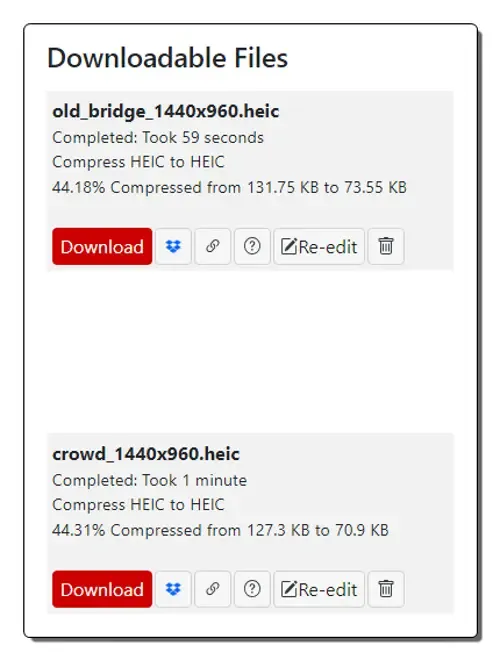
xconvert.com is a free online compress HEIC website. With the help of this website, users can compress HEIC images in bulk. Plus, it can fetch HEIC images from cloud storage services. After uploading HEIC images, users can change the output file size in percentage, specify exact output image size, or reduce image quality. Users can also adjust the resolution, width, and height of images. After specifying all the parameters, users can start the compression process. Now, follow the below steps.
How to compress HEIC images online using xconvert.com:
- Go to this website and open up the Compress HEIC tool.
- After that, upload one or more HEIC images.
- Next, adjust output image size, reduce quality, resolution, etc.
- Finally, click on the Compress button to start the compression process.
All compressed images can be saved in HEIC image format.
Additional Features:
- This website offers a wide range of online tools like Encoding, Decoding, Merging Files, Compress Files, Crop Tools, Video Compressors, and more.
Final Thoughts:
It is one of the best free online compress HEIC websites that allows users to specify output image size and quality before starting the bulk HEIC image compression process.
| Pros | Cons |
|---|---|
| Compress HEIC images in bulk | |
| Lets users specify the compression level, output image size, and image quality | |
| Users can adjust image resolution |
imagecompressor.11zone.com
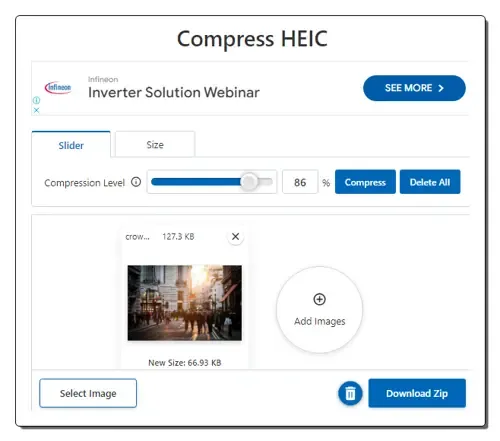
imagecompressor.11zone.com is another free online compress HEIC website. This website can compress multiple HEIC images at a time. Apart from HEIC, it supports image formats like PNG, JPG, JFIF, SVG, TIFF, WEBP, CRW, CR2, and more. Before starting the image compression process, users can specify the compression level through a slider. Users can also set an output image size ceiling through the Size tab. After HEIC image compression, users can save them in JPG format. Now, follow the below steps.
How to compress HEIC image online using imagecompressor.11zone.com:
- Visit this website and access the Compress HEIC tool.
- After that, specify the compression level or output image size.
- Next, click on the Select Image button to browse and select one or more HEIC images.
- Finally, let this tool upload and compress all the images.
Additional Features:
- This website offers multiple image optimization, image conversion, image editing, PDF Split, PDF View, and file conversion tools.
Final Thoughts:
It is a good online compress HEIC website that can batch compress HEIC images.
| Pros | Cons |
|---|---|
| Compress HEIC images in bulk | Saves compressed HEIC images in JPG format |
| Lets users specify the compression level or output image size |
compresss.com
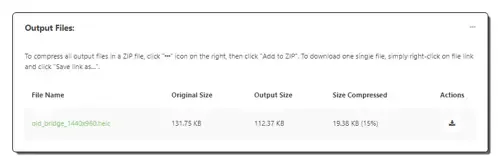
compresss.com is another free online compress HEIC website. It is another good website that can batch-compress multiple HEIC images. It can also be used to compress JPG, PDF, PNG, GIF, SVG, WEBP, etc., files. Before starting the conversion process, users can specify the HEIC image quality which can vary from 1 to 100. After HEIC compression, it shows the original size, output size, and reduced size values. Now, follow the below steps.
How to compress HEIC images online using compresss.com:
- Go to this website and open up the Compress HEIC Online tool.
- After that, upload one or more HEIC images.
- Next, specify the HEIC Quality.
- Now, let this tool initiate the compression process and download the output files.
Additional Features:
- This website also offers tools to compress websites, documents, videos, and audio files.
Final Thoughts:
It is another good online compress HEIC website that allows users to compress up to 100 HEIC images at a time.
| Pros | Cons |
|---|---|
| Compress HEIC images in bulk | |
| Users can specify the HEIC image quality |
redketchup.io
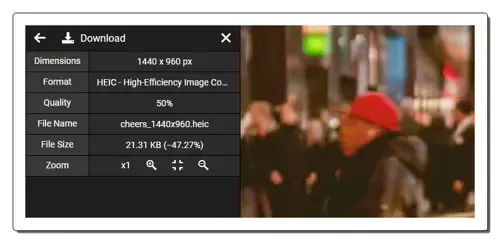
redketchup.io is another free online compress HEIC website. This website offers a standard image compression tool that can compress images of various formats (JPG, GIF, XBM, JFIF, TIFF, WEBP, etc.), including HEIC. However, it can compress one image at a time. Before starting the HEIC compression process, users can specify the maximum file size, image quality, and image name. An inbuilt preview tool is also provided to preview the compressed image. Now, check out the below steps.
How to compress HEIC images online using redketchup.io:
- Visit this website and access the Image Compressor.
- After that, upload one HEIC image.
- Now, specify the image quality, output image size, image name, etc., parameters.
- Finally, preview the image and save it in HEIC format.
Additional Features:
- This website has handy tools like Bulk Image Resizer, GIF Resizer, GIF Converter, Icon Editor, Icon Converter, Favicon Generator, and more.
Final Thoughts:
It is another simple-to-use online compress HEIC website that allows users to specify the image quality and maximum file size.
| Pros | Cons |
|---|---|
| Users can specify the image quality and output image size | Only compress one HEIC image at a time |
compress-image.net
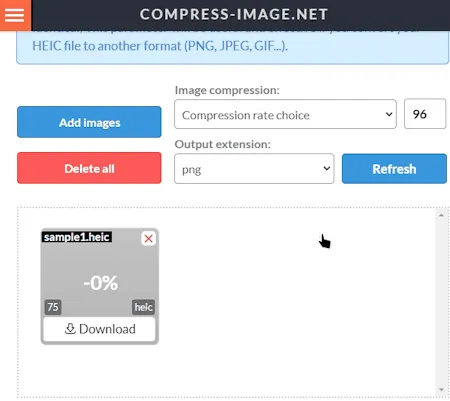
compress-image.net is another free online compress HEIC website. Through this website, users can compress up to 20 HEIC images at a time. Plus, it lets users manually specify the image compression level. Two presets namely Best Quality and Best Compression are also available. I also like its ability to save compressed HEIC images in PNG, JPG, GIF, WEBP, etc., formats. Now, follow the below steps.
How to compress HEIC images online using compress-image.net:
- Visit this website using the provided link.
- After that, specify the image compression level and output image extension.
- Now, upload up to 20 HEIC images to start the compression process.
- Finally, download all the compressed HEIC images.
Additional Features:
- This website offers tools to compress images and files of various formats like AI, PDF, SVG, AVIF, BMP, and more.
Final Thoughts:
It is another good online compress HEIC website that anyone can use to compress HEIC images.
| Pros | Cons |
|---|---|
| Can compress HEIC in bulk | |
| Can specify the compression level |
Frequently Asked Questions
You can use online Compress HEIC tools to quickly compress one or more HEIC images. These tools also let users adjust the compression level and specify the output image size they want after the compression.
Does HEIC reduce image quality?
No, HEIC generally doesn’t reduce image quality compared to JPEG, and in some cases, it can even be better than JPEG.
You’re correct! HEIC files are considered compressed files. While they may not be referred to as “compressed files” in everyday use, they technically fall under that category.
What are the disadvantages of HEIC?
HEIC is primarily used by Apple devices. While support is growing, many other devices, platforms, and software (Windows, Android, web browsers) still require conversion to view or edit HEIC files. This can be inconvenient if you need to share images with people who don’t have compatible software.